Cisco Live: Lessons Learned as a First Timer

After around 12 years in the industry, primarily working on Cisco gear, I finally got to my first Cisco Live. I want to keep this fairly short so I’m just going to jump right in with my seven lessons learned.

1: Get in early. Get the earliest flight into town as you can. If you plan on taking a session or two on Day 0 make sure you are there the day before. My flight was pretty uneventful getting in on Sunday but there were a few stories of people getting delayed and showing up very late Sunday night. That makes for a pretty rough Day 1 on Monday. I am considering coming in a full day early so I can settle in a bit more. I felt rushed to check-in and head down to the Cisco Champions events we had planned. I also had a team dinner to get to that night. If I flew in on Saturday night, Sunday would have felt a lot less stressful.

2: Stay as close to the convention center as possible. I stayed at the Luxor because it was cheap. For an extra couple hundred dollars I could have stayed at the Mandalay Bay. I walked about 31 miles, in Vans. Probably half of that was walking between the convention center and the Luxor and then down to the MGM for a few events. Aside from not getting in almost 80,000 steps, I could have had more “down time”. Have 30 minutes between sessions and feel like kicking your legs up? Head upstairs. To my room was about 3,800 feet in a straight line from the convention center. With all the turns, you’re probably looking at a 1.5 mile round trip.

3: Wear comfortable shoes. Did you notice how I said I walked 30+ miles in Vans? Yeah, that was a huge mistake. I didn’t want to look like a full blown dork so I didn’t wear my running shoes. Don’t be dumb. The conference was full of giant dorks. Just wear your trainers and don’t get blisters. Even if you stay at the convention center, you’re still gonna walk a lot.

4: Book out your week but be completely willing to bail on sessions or events. Just make sure you unregister on the app from your sessions so others can join. Most of the sessions I attended were fantastic. I had one dud that should have been called 6GHz for dummies. It looked like a more in depth class but really it was very entry level. That’s not a bad thing, however I wasn’t the target audience. I actually stepped out early on it. Look, I know these guys and gals spend a lot of time preparing for their sessions but at the end of the day you or your company are paying a lot of money to attend. Use your time wisely. I was able to head right back down to the World of Solutions to do some more walking around. That was a better use of my time. You also might not feel like attending a session you registered for. I missed one on Thursday morning because, well, Elton John. It’s OK. Be flexible. Don’t go crazy and crash and burn on Day 2.

5: Kinda following in number four’s footsteps is: Make room for the World of Solutions. There are so many really incredible things to do down there. From Capture the Flag events, to vendor demos, to just hanging out with folks you came with or just met. Take advantage of what is there. As an individual (and a team) I had several very good conversations downstairs with Cisco teams and a tons of vendors. In fact, we are kicking off three proof of concepts in the next two weeks based solely on those conversations. One with a Cisco product and two with vendors.

6: Go to the dinners you get invited to, within reason of course. There were some really good ones this year. I also heard there were a couple of flops. If it’s a 100% sales pitch, skip it. But if it’s about networking (the people kind), go for it! Cisco Champions Banters and Beers was a ton of fun. So was my VAR’s event. So was the ThousandEyes event.

7: Most importantly, make new friends! Be awkward, ask to join a circle of folks chatting. During meal times sit with people you don’t know and introduce yourself. Every single person I met during CLUS was awesome and willing to let me in. Further, I have spent a considerable amount of time on Slack, Discord, NUGs, and Twitter over the years. Meeting all of those people in real life was by far the highlight of the week for me. The networking community is the best in the IT world (especially us Wi-Fi nerds!). Get to know people. They can help you with problems you’re facing both at work and in your personal life. They will rally around you no matter what. It’s what we do.

I think I did pretty well for my first CLUS. I had a great time and feel like I was able to maximize my experience. Let me know in the comments what things you have found to work well for you.
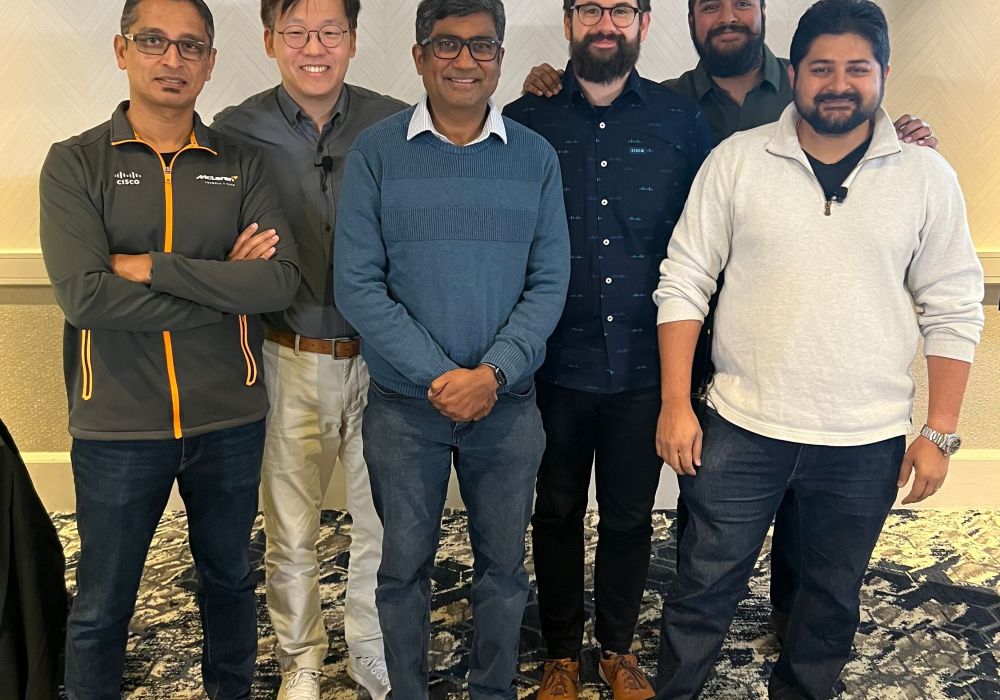
Cisco Presents at Mobility Field Day 10

At Mobility Field Day 10, Cisco presented on several new features and APs. It was a bit like drinking from a firehose. There are a lot of great things already in the ecosystem and a lot of exciting things to come. Rather than just recap the whole presentation (you can watch it here), I wanted to focus on one specific area. The Cloud-Enabled model of deploying wireless solutions.

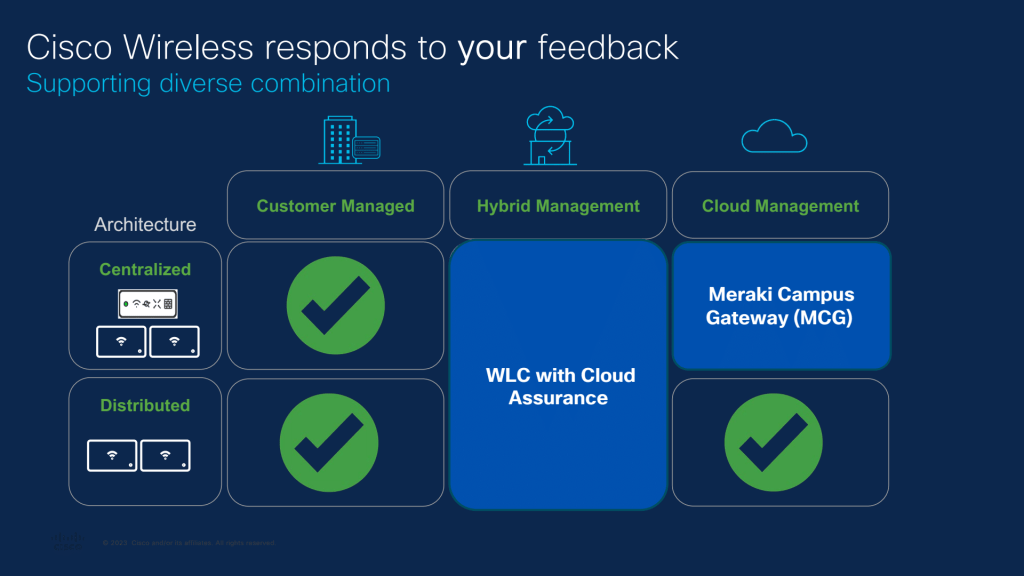
There is a big rush to cloud management across the industry. There are several big-name vendors that are cloud first or cloud only. This isn’t a bad thing or wrong by any means. It’s just a different philosophy. Cisco continues to be an on-prem first model within the Catalyst ecosystem. If you want cloud managed, you have the Meraki line available. I think they both have their places depending on your business model and size. My place employment is a large hospital system and we are very much an on-prem first organization. However, it would be nice to have some of the features that Meraki has built in available to us. Enter the Cloud-Enabled/Hybrid option.

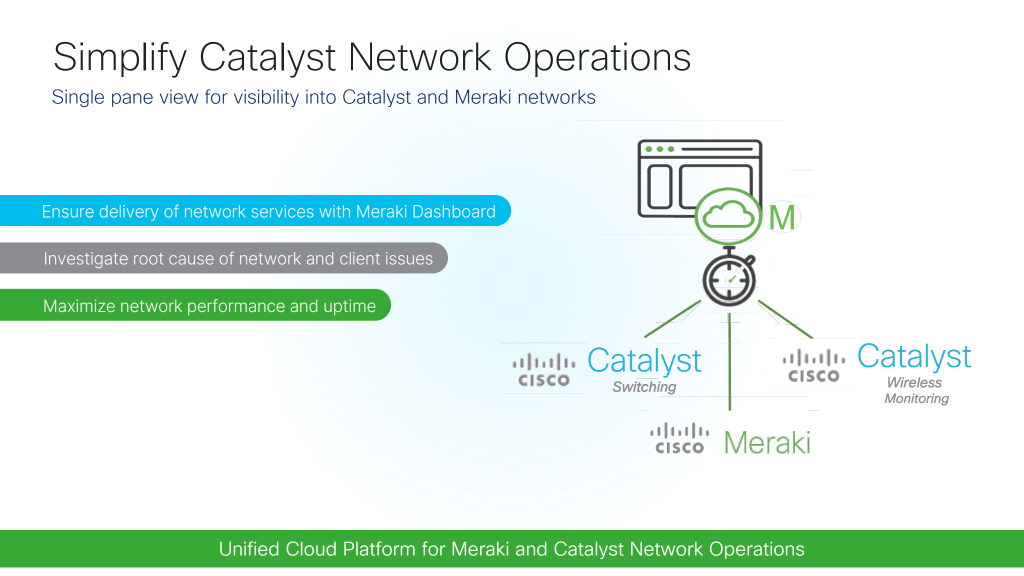
Cloud-enabled allows you to retain control on prem using Catalyst controllers while bringing in the cloud monitoring and troubleshooting tools available in the Dashboard to your fingertips. In my opinion, this is a huge win especially for larger companies with more siloed teams. With the Meraki Dashboard you have a single pane of glass for delivery assurance, troubleshooting, and performance monitoring. This takes a lot of easier tickets off of the wireless SME’s desk and keeps it down at your helpdesk or tier 1 support. A few low hanging fruit issues that can be quickly identified as well as a couple of new features:

  • Event correlation and monitoring
  • Problem analysis looking for larger root cause issues impacting wireless
  • Performance, utilization, and capacity monitoring
  • Change tracking and configuration drift analysis
  • API integration for easy data exfiltration

Another added value is Catalyst and Meraki in the same place. We deploy Meraki in a few smaller sites and now we can see those sites in the same place as our traditional on-prem controllers. This is a pretty big value add for me since we do have some Meraki deployments.

“But Mike, what about licensing costs?” Ah, no worries! Your existing DNA licenses allow for Dashboard integration so you don’t have that concern.

“Is this a replacement for Catalyst Center (the management platform formally known as DNAC)?” No, this is mostly for easy and quick monitoring and troubleshooting. Catalyst Center and Assurance still have their place for deeper dives and more complex device configuration and management.

“What requirements are there to put my 9800 into the Dashboard?” I’m glad you asked. You need to be on 17.12.3 or 17.15.1 or later in order to put them into Dashboard monitoring. There is also a max of 2,000 APs and 20,000 clients per controller. You also need to make sure your MRs and Catalyst APs are in different “Dashboard Networks”. If you’re familiar with Meraki, this is pretty straight forward.

“How difficult is it to integrate my 9800?” It’s as easy as creating a new network in Dashboard and using the device ID you pull from your 9800 to adopt the device. It’s basically exactly like adopting Meraki devices. Very straight forward, especially if you have Meraki experience.

A couple of quick takeaways for me. I’m really excited to get a pair of lab 8900s up to 17.12.3 to drop them into the Dashboard. I’m looking forward to providing another tool for our operations group to efficiently troubleshoot “Wi-Fi issues”. It will also be nice to monitor the overall health of different hospitals at a quick glance. My job is primarily design and deployment on projects but I do get pulled into a lot of t-shooting calls. Sometimes those things are pretty simple, and while I don’t mind helping out and training up folks, I would prefer to keep that time dedicated to other things.

What are your thoughts? If you currently deploy Catalyst controllers do you plan on adding them to Dashboard for monitoring?

The Dashboard presentation can be found here.

Mike vs The CCNP ENWLSI 300-430

After reading and re-reading my post I want to add a little disclaimer. Even though I was pretty frustrated with the overall experience, I do recognize that Cisco Learning and Cisco Press are in a weird spot with wireless right now. They had to include two very different ecosystems in the exam and books when it was created over two years ago. They had to somehow figure out a way to assess engineers within those ecosystems with just ~60 questions. That’s a tall order. Yes a bunch of stuff on the exam is EoL and yes it is frustrating having to focus so much energy on platforms most of us have removed from our environments. I’m not necessarily upset with the content creators or the exam writers. They are in a tough spot due to the current product lineup. Now, on with my rant/experience writeup.

In mid-December I finally passed the ENWLSI 300-430. I sat for it the first time back in August of 2021 and bombed the thing with a 754 (back when we were still getting scores). I pretty much swore off the exam at the time and stepped away from certifications for a while. It was a frustrating experience to say the least. Fast forward nine months: My CCNP was expiring in March of ’23 and I already had some continuing education credits. I decided to put aside my pride and get back after it. I took a couple of the free Cisco Learning courses to get enough CECs to put me over 40. All I needed was a specialist exam for the remaining 40.

I did a lot of poking around on Slack, Discord, Twitter, and Reddit and the consensus was that the Cisco Press Official Certification Guide does a pretty terrible job of preparing you for the exam. Agreed. I’m not sure exactly what happened with that book but it was a huge miss which is a bit odd because the first half (ENWLSD) was great. The overwhelming advice was to pick up the CCIE-W v3 book and dig through it. I had recently deployed my first pair of 9800s and we had DNA-C in prod so I had real world time on both platforms. I figured that would help quite a bit since I didn’t have that experience the first time around the previous summer.

I got my hands on a copy of the CCIE book and started working my way through. It’s a great resource, especially if you still have a lot of AireOS in your environment. I was also reading the config guides on the 9800 and in the fall the Understanding and Troubleshooting Catalyst 9800 WLCs book came out so I picked that up too (another great resource, not just for the test). Then I saw that Network Dojo had just released their ENWLSI course and labs. I highly recommend this course, Jeff and the team really put you through the paces. At this point, not only did I have a ton of book knowledge but countless hours on IOS-XE as well as a few years of experience on AireOS. I was ready.

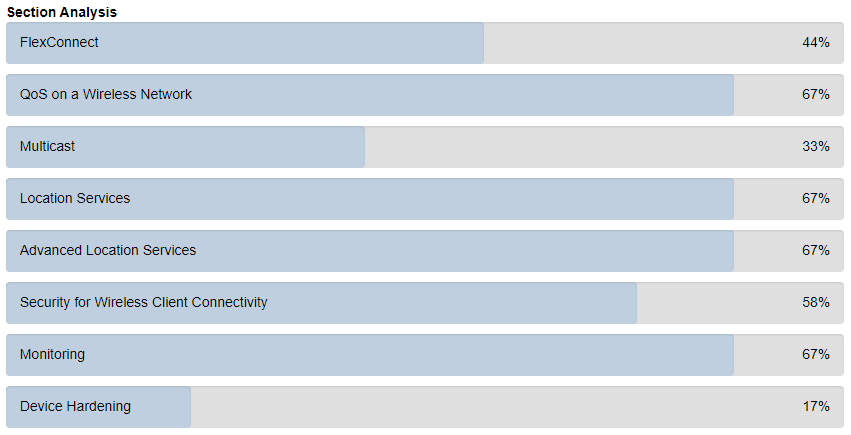
At the end of November, feeling very prepared, I sat for the exam. Result: Failure. Incredibly frustrating but this time I knew I was close. I got my score report back and saw that I had missed pretty badly on Advanced Location Services. I doubled down on CMX/MSE over the next two weeks and took the exam again. I brought that section’s score up which was enough for a pass. Honestly, some of the questions in that category were worded so poorly it was difficult to even understand what they were asking. I hope they read the question comments. I will say this, the 2nd and 3rd attempts really felt like a 1st and 2nd attempt. When I had originally taken the exam a year and a half ago I was woefully underprepared. I had always found that the OCGs mixed with some config guides and command references were enough. After all, that’s how I achieved my CCNA, all three CCNP R&S exams, and the ENWLSD. That just wasn’t the case for the ENWLSI.

Takeaways

There’s a great movie out there called Burn After Reading. The last scene in the movie goes like this:

CIA Superior: What did we learn, Palmer?

Palmer: I don’t know, sir.

CIA Superior: I don’t f***in’ know either. I guess we learned not to do it again.

Palmer: Yes, sir.

CIA Superior: I’m f***ed if I know what we did.

Palmer: Yes, sir, it’s, uh, hard to say

That’s kinda how I feel after this one. If you’ve taken this exam you know exactly what I mean. I don’t really know what the exam was trying to do and I definitely don’t want to take this version ever again. Obviously I’m not going to break the NDA here but that exam is in serious need of an overhaul. It looks like the CCNP Enterprise track is going to get refreshed sometime in late 2023. I certainly hope the ENWLSI is part of that. When I went over the blueprint I admittedly looked past some key items and focused too much on the Catalyst WLCs and DNA family. My biggest takeaway here is to focus ONLY on what is included in the blueprint. Even if a topic takes up a ton of ink in the OCG, if it’s not on the blueprint ignore it. All that said, I really don’t feel like the exam does a good job certifying that an engineer is qualified to deploy and run Cisco’s current wireless ecosystem. At the end of the day, that’s what these exams are supposed to do and why we, as engineers, spend so much time and money certifying. Unfortunately the current ENWLSI misses the mark when it comes to that goal.

2021: A Recap and Looking Forward

2021 was an interesting year to say the least. I had some big plans for career progression and a handful of certifications to knock out along the way. I wanted to get both CCNP-W exams done (ENWLSD and ENWLSI), start playing around with Python, and get the DevNet associate taken care of to launch into network automation. The CWAP was a moon shot target for the end of the year/early 2022. After that I would look to make a career move into WiFi full-time. As they say, reality gets in the way sometimes and only one of those goals was crossed off the list. It is important to remember that it’s OK to “fail” at these sorts of things which is a big reason I mostly “write goals down in pencil”. At the end of the day they are just goals, don’t beat yourself up too much if you don’t hit them all. Projects ramped up at work, some disappointments left me disillusioned with an exam, and personal stuff slowed me down quite a bit. That didn’t mean the year was a waste or that I didn’t see any progression.

A busy year at work

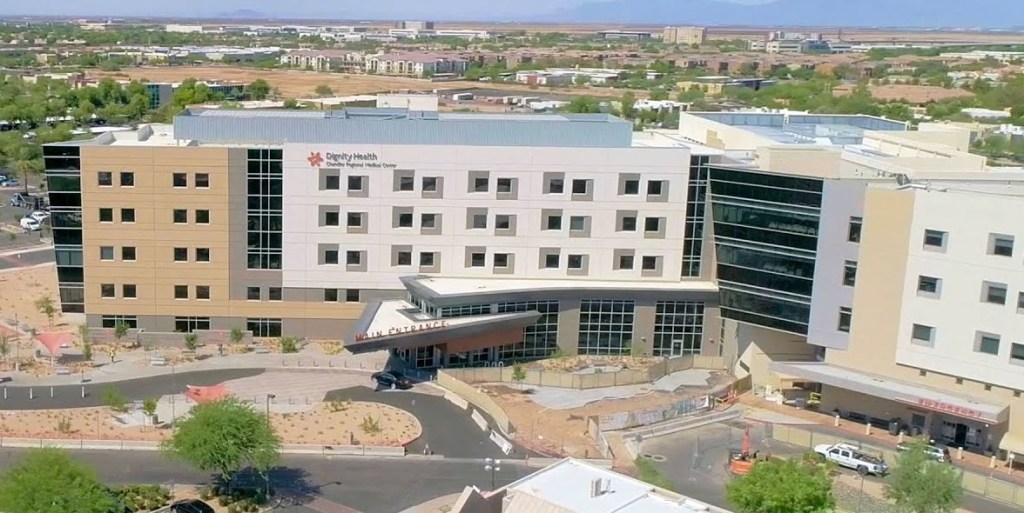
The first year of COVID saw a ton of projects put on hold due to the potential risk to infrastructure stability during a pandemic. Once we had a better understanding of what we were facing as a country and a hospital system, the floodgates were opened up. We had a big backlog to get through plus everything planned for ’21. Some of these ended up being quite the mental drain and I just didn’t have the drive or capacity to open up a book at the end of the day. It seemed like one thing after another was last minute or on a very short timeline to begin with. One of my largest projects was bringing a new tower online at one of our hospitals. We dropped in nine 9410s, a pair of 5520s, and an additional 150 APs to support ~100 new patient beds. With all of the supply chain struggles and COVID restrictions it dragged on. This project ended up being a lot of fun and a huge pain all at once. It definitely felt good to get it done and it is probably the one thing I’m most proud of so far in my career. Less so for the complexity and more so for the community impact.

The entire left side past the ED is all new.

Frustrations with certifications

On the certification front I had some fairly ambitious goals. I was coming off of my CWDP in late December 2020 and was able to roll that momentum straight into the ENWLSD. I passed with flying colors in March. That exam was really straightforward and accessible after the CWDP. Honestly, it may have been TOO easy for a CCNP level exam. If you’re thinking about targeting it, maybe go get it out of the way before Cisco figures that out and makes revisions. I kept pushing to finish my CCNP-W track with ENWLSI and absolutely bombed it in August. This was very demoralizing after spending hours upon hours studying. Without getting into too many of the details (NDA and all that) the OCG (and frankly some of the blueprint) really didn’t line up well with the actual exam.

I vented on Twitter and /r/networking and found that I was in pretty good company. Most people found the exam to be troubling from an expectations perspective. The OCG was woefully inadequate making things much worse. I had been passing my Cisco Press practice exams in the 80% to 90% range setting me up for a false sense of security. I got frustrated early in the exam and things unraveled from there. My score report is below, needless to say, it was rough. I ended up walking away from that one unsure if I would ever sit for another Cisco exam because of how frustrated I was.

Taking a break

I put the ENWLSI book on the shelf and haven’t looked at it since. I did not even crack open the DevNet Associate book and I didn’t write a single line of Python in 2021. Things were pretty crazy around here with an insanely busy year at work, both kids in school, extracurricular activities for them, my wife ramping up from part-time to full-time work, and just the mental drag that has been the last two years of living in a pandemic. I let myself relax for a while which was a great decision. It was a very good season for me personally. It really is important to make sure you’re taking care of yourself. Grinding all of the time is hard. I’ve spent the last decade chasing certifications, promotions, and that next raise because I started this career later in life. I had to play catchup. I honestly don’t think I’ve taken much of a break from pushing for the next thing since I started in 2012. The rest was long overdue and I plan on working that in more over the next few years.

A new gig

There was one pretty unexpected win that came in November. Through some discussions and a possible opportunity outside of my org, I ended up landing on the wireless team here at my current employer. I had been having conversations with leadership about this for the last six months and we were trying to put together a road map to get there. Staffing in a very large organization is complex and slow but a window opened up and I was able to get placed on the team. I officially start with them in the new year and I’m really looking forward to expanding my wireless experience.

Looking forward

Even with the job change, I’m not going to stop pursuing progression. After taking all of that time away from certifications, I am feeling much better about jumping back in. A common piece of advice among those who eventually did pass the ENWLSI was “Pick up the CCIE-W v3 book”. I purchased that and started on some Anki cards this fall and will ramp up heavily in January. The plan is to finish the ENWLSI and then get after my CWAP. As for DevNet Associate, I think I got caught up in that whirlwind. Although it does look very interesting and there’s a ton of use for automation in my job, I’m going to focus on settling in over the next year. I’ll approach automation again sometime in very late 2022 or early 2023 if, and only if I have the capacity to do it right. Like I mentioned above, I’m going to slow things down a little and focus more on other aspects of life outside of work and career.

I hope everyone had great Christmas with family and friends. Here’s to a happy and healthy 2022!